


Seamless connectivity is more important than ever to get the data instantly, whether you are managing a home office or optimizing a smart home. In computer networks, the Hub plays a crucial role as it serves as a central connection point within LAN (local area network), allowing the devices to communicate easily with each other and share data.
For instance, a USB hub allows the user to connect keywords, a mouse, external drives, and webcams to a laptop with limited USB Ports. The hub operates at the first layer of the OSI (Open Systems Interconnection) model, which is the physical layer and is mainly used in small and basic networks. Hub is one of the basic networking devices in comparison with other connectivity devices like switches and routers. Let’s understand the power of Hub to expand your connectivity options.
What is a Hub?
A hub is a networking device that serves as a central connection point and connects multiple devices that send and receive data through the hub. It operates at the physical layer, unlike switches, which operate in the data link layer. So, the hub focuses on raw data transmission without any data preprocessing or intelligence.
It is also a multiport repeater that comes with add-on functionalities, like indicating any issues with the device. It handles a data type of frames and any data coming from any one of the connected devices in the hub can be forwarded to another connected device. When it comes to connectivity options, hubs can be categorized into different types based on functionality, like Passive Hubs, Active Hubs, and Intelligent Hubs.
How Does Hub Work?
Hubs receive the data signals from the connected devices and rebroadcast them to all the other devices in the network. This broadcast approach is also called store-and-forward transmission, as the hub isn’t involved in any data filtering and processing. As soon as a device sends the data, the hub receives it and immediately sends it to the other connected devices.
A hub consists of multiple ports, and each port can connect one device. Similarly, multiple individual devices can be connected through the port, and all will be connected.

Types of Hubs Based on Functionality
Functionality is the basic criterion to distinguish between different types of Hubs, which distinguishes hubs on how they transfer the data. Let’s understand the different types of hubs:
- Passive Hubs
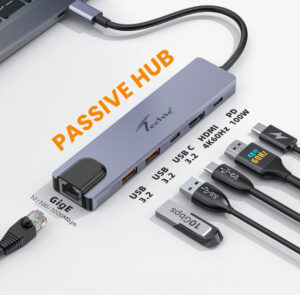
A passive hub is called an unpowered hub, as it doesn’t require any external power source for its operations. It physically connects the devices through cables and doesn’t require signal amplification or regeneration. That’s why passive hubs have limited transmission distances and support a fewer number of ports.
- Active Hubs
An active hub, called a powered hub, requires an external power source to operate. It amplifies and regenerates the incoming data signals to enable data transmission to long distances without signal degradation. Active hubs can support a larger number of ports, and hence, they are suitable for expanding network connectivity.
- Intelligent/Smart Hubs
A smart hub is the key piece of a complex smart home setup. It acts as a bridge that allows different smart devices to communicate and work with each other to create a unified system. As the name suggests, smart hubs, unlike passive and active hubs, do not send or forward data unquestioningly. These are designed to analyze, manage, and direct network traffic efficiently.
These hubs do not forward the data signals to all the devices; rather, with smart data forwarding, they forward the data packets to the intended recipient only. It reduces traffic congestion and optimizes the data flow.
Hubs can also be categorized on the basis of use cases and technologies, like:
- USB Hubs for peripheral connectivity
- Network hub for data transmission
- Docking stations for laptops and workstations
- Industrial hubs for large-scale networks
- Smart home hubs for IoT and home automation
When and How to Use a Hub?
A hub is suitable for small and localized networks that do not need to process voluminous amounts of data. Thus, it is perfect for home office or small business use as it is simpler and more cost-effective to maintain as compared to other types of networks.
Hubs can also be used in cases where multiple users need simultaneous access to shared resources like printers or file servers. Hub networks are less prone to bottlenecks because of the uniform broadcasting of data, so it prevents single devices from dominating the available bandwidth. All connected devices will have the same bandwidth as all have equal access to it.
Let’s understand how the hub can be used in a network setup:
- Network Expansion: Hubs are suitable for expanding the existing network to other devices as they allow more devices to be connected. It is an easy and cost-effective alternative without needing additional cabling to add more devices.
- Data Sharing: When multiple users or devices the access to the same shared data or resources, the hub is a suitable option.
- Simplified Management: A hub centralizes all the network’s traffic, making network management simplified. Network administrators can monitor and control all the network activity from a single location.
- Cost-Efficiency: In cases with restricted budgets, a hub is a cost-effective and impactful solution as compared to a switch or router for small and localized networks.
- Low Latency: Hubs are suitable for applications that require real-time data transfer, like video streaming or teleconferencing, as they offer low latency.
Boost Your System’s Connectivity with USB Hubs
A USB hub is a multi-port device that increases the number of connections of USB devices to your computer or laptop. It has one USB upstream port that connects to the computer and multiple downstream ports that connect to the USB devices. Here’s why one should invest in high-quality USB hubs:
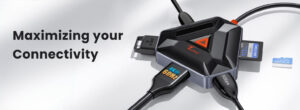
- To connect peripheral devices: USB Hub can be used to connect peripheral devices, like printers, scanners, external USB-C drives, and more. It can extend your laptop’s connection capabilities if one of the system’s ports is not working. For such purposes, it is recommended to invest in high-power and number of ports USB Hub.
-
- To charge multiple devices at once: Some USB Hubs come with charging capabilities. They can charge connected devices, like smartphones, laptops, and other USB-powered devices when it is connected either to the computer or plugged into a power adapter. It is essential to note the power delivery (PD) of the hub to ensure a fast charge, like Techie’s TC Connect 3-in-1 Type C Hub features 100W PD while offering upto 10Gpbs transfer speed.
- To use more gaming hardware: Gamers use multiple devices, like gaming mic, consoles, hardware, and keywords, to create an interactive setup for a good gaming experience. It is suggested to invest in USB Hubs with a high number of ports, like upto 6, to streamline the connections.
- To setup a home office: USB hubs are helpful in setting up a home office as connecting multiple devices to the hub frees up the port on your laptop/computer. This is beneficial when you have one laptop with one or two ports. Then, you can invest in a compact 3 in 1 USB Hub.
- To help with home entertainment setup: USB Hub or USB Cables can be used to set up a home entertainment setup. The USB Hub can be connected to the smart TV, and the rest of the external devices, like hard drives, to the USB Hub for media playback.
- To assist with photography and videography: Photographers and videographers use multiple USB devices, like cameras, external hard drives, and memory card readers. A USB Hub is a straightforward way to connect all these devices together with the computer. It is preferred to go for a USB Hub that is specifically designed for such purposes, like the ones with a high number of ports and transfer rates.
The Bottom Line
The hub is a suitable network connectivity device for small and localized networks. Hubs are simpler to set up and require minimal configuration, making it easier for anyone to set up. They are less expensive as compared to other network connectivity devices and transfer the data to all the connected devices.
However, there are some disadvantages associated with hubs, like limited transmission distance, limited in-built security features, and increased chances of collision. A collision happens when two devices in the network send data at the same time. This can lead to data loss and retransmission.
With advancements in network connectivity technology, there are hubs with smart data forwarding feature, where only intended recipients receive the data signal. If you are interested in buying a hub, Techie supports a range of Type C and USB hubs at affordable prices with a 1-year warranty and a 7-day return policy.
FAQs
- Is Hub required to connect to the Internet?
No, a hub is not necessary for connecting to the Internet. A modem or router is required to connect to the Internet.
- How many ports does the USB hub have?
A USB hub can have a minimum of 4 to a maximum of 10 ports. However, the number of ports in USB depends upon the specific requirements.
- Does the network hub affect speed?
Yes, network hubs do affect the speed because they can’t prioritize traffic between devices. All the devices have access to the same bandwidth, and the overall speed reduces when multiple devices are simultaneously used.


