


Thanks to the fast-paced world we live in, laptops have become an integral part of our lives. Laptops have become a staple, from professionals using them for their work to students using them for their education.
However, a laptop is not immune to wear and tear, and with time, its performance will degrade. Sluggish speed, overheating battery, and sudden shutdowns are some signs that indicate that your laptop is aging.
A battery cycle count is one of the most important but overlooked aspects when it comes laptop’s longevity. Besides keeping up with hardware maintenance and software updates, one should also monitor the battery cycle count. It is the best way to gauge the laptop’s performance, and it can help extend your device’s lifespan, optimize performance, and prevent premature replacements.
Knowing what a battery cycle count is, how it affects your laptop’s performance, and why it is important can help you get the maximum lifespan out of your device and get it to perform optimally.
What is the Battery Cycle Count?
A battery cycle count refers to the number of complete charge and discharge cycles a laptop battery has completed. A laptop’s battery cycle count increases every time the battery goes through a full discharge and complete recharge (equivalent to 100%). It doesn’t mean charging from 0% to 100% in one go; rather, it is cumulative over multiple charging sessions.
For example, one day, you use 50% of your battery’s charge, recharge it to full, and then the next day, you use another 50% and then recharge it to 100% — that would be one full cycle. In short, it tracks how much that battery has been used over its lifetime.
The battery cycle count differs from laptop’s model to model, and brand to brand. For instance, some Apple laptops have a battery cycle count of 500, while some Lenovo models have a battery cycle count of 300. Usually, the battery cycle count remains between 300-1000, and it can indicate how many charging cycles the battery can handle before it needs to be replaced.
The Science of Battery Cycle Counts
To understand the science behind battery cycle counts, it is important to recall what a battery is. A battery is a device that stores electrical energy in chemical form and converts it into electricity. It consists of one or more electrochemical cells that generate an electrical current when a chemical reaction occurs.
As a battery goes through more charge cycles, its ability to hold a charge gradually decreases. This is because of the chemical wear happening inside the battery, where the lithium ions degrade over time.
Let’s understand what happens when the laptop supports a Lithium-ion battery:
- Lithium-ion migration: The lithium ions move from the cathode (positive electrode) to the anode (negative electrode). During discharging or when the laptop is in use, the ions move back to the cathode, releasing energy.
- Electrode degradation: With each cycle, the electrodes undergo structural changes, leading to wear and tear. The anode can develop a buildup of unwanted materials (solid electrolyte interphase), reducing efficiency.
Once the battery cycle count reaches its maximum, like, say, 1000, then it means that the battery has gone through the maximum number of charge and discharge cycles. Once it exhausts its limit, the battery’s capacity starts to decrease.

Over time, the battery can no longer store the same amount of charge. For instance, a battery that once lasted 6 hours may drop to 4 hours after several hundred cycles. Once the battery levels drop to just 1-2 hours’ capacity, then it is a sign that the battery needs to be replaced.
Why Is Battery Cycle Count Important?
The battery cycle count reflects its health and capacity. The higher the battery cycle count, the lower the battery capacity and the shorter its battery life. Let’s understand the importance of battery cycle count:
1. Indicates Battery Health
One direct way to gauge your battery’s health is to check the cycle count. As more and more cycles are done, the battery’s ability to accept a charge reduces. For instance, a new laptop battery can reach 100% capacity but potentially lose 20% after 300-500 cycles of charging. The cycle count lets you know when a battery is nearing the end of its life and it’s time for a replacement.
2. Impacts Performance
Not only can a battery with a high cycle count drain quicker, but a high cycle count can also impact your laptop’s overall performance. When the battery performance diminishes, the system can throttle performance to save power, which could result in slower processing speed and lower efficiency.
3. Cost-Efficiency
Having the battery replaced can be expensive. Monitoring the cycle count allows you to replace the battery before it completely fails, preventing unplanned outages or increased costs. Also, if you monitor that the battery cycle count is reaching its maximum limit, you can delay the degradation by following the best practices to maintain the battery’s health.
4. Environmental Responsibility
Batteries contain toxic materials that may harm the environment if they are not properly disposed of. Save electronic waste by decreasing battery cycles, and by improving your battery’s life, you avoid contributing to electronic waste.
Ways to Check Laptop Battery Cycle Count
Just like how the battery cycle count differs from model to model, the ways of checking the battery cycle count depend on the operating systems. Here are different ways to do the same in different operating systems:
1. Windows
Enter cmd in the Windows Search bar, and run the powercfg /batteryreport command in the shell. Follow the instructions displayed, and open the generated HTML file to view the battery cycle count and in-depth information.

2. macOS
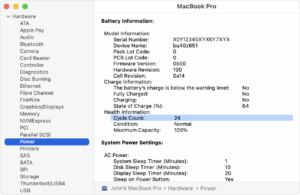
With the Option key held down, click the Apple menu, then choose “System Information.” The cycle count can be found under the “Power” section, which will be mentioned in the Hardware section.
3. Linux
Use terminal commands, such as power -i /org/free desktop/UPower/devices/battery_BAT0, to view detailed battery information.
Sometimes, the battery cycle count may be missing from the battery report. However, there is no need to panic because it could happen due to several reasons. For example, your laptop’s battery doesn’t support cycle count monitoring, or your battery driver is outdated or not installed properly; that is why the system couldn’t retrieve the cycle count data.
So, if your laptop doesn’t include such built-in tools, third-party applications such as:
- HWMonitor, BatteryInfoView, Battery Care for Windows
- Coconut Battery and iStat Menus for macOS can also provide this information.
What Affects Battery Cycle Count?
Every battery has a finite number of charge cycles, and various factors could either accelerate or slow down its ageing process. Let’s understand the factors that can affect the battery cycle count:
1. Usage Patterns
Cycle count increases with frequent charging and discharging. For instance, using your laptop when plugged in lessens the cycles. While continuously depleting the battery to zero and then recharging it, the cycle count increases.
It is because when the battery is plugged in, it directly draws power from the charger, rather than discharging the battery. So, it is not going through frequent charger and discharge cycles. However, it is advised to unplug occasionally because constantly charging keeps the battery level at 100%, which can cause heat buildup and accelerate its wear.
2. Temperature
Colder conditions can negatively impact battery health, but extreme temperatures do most of the damage. Don’t leave your laptop unattended in extreme heat, and don’t use it on soft surfaces that block its ventilation.
3. Charging Habits
Using incompatible chargers or overcharging your device may put extra stress on the battery, thus increasing the cycle count and decreasing its longevity. While choosing replacement batteries for your laptop, ensure the charger has the same voltage (V) and at least the required wattage (W). Using a lower-wattage charger can overwork the battery, while an excessive-wattage charger can cause overheating. Also, buy CE/RoHS-certified or BIS-approved batteries from reputable brands that match your laptop’s power specifications.
4. Battery Age
Batteries deteriorate over time due to chemical ageing, even with minimal use. When an older laptop battery has a low cycle count, it may still perform poorly.
Tips To Charge Battery Cycle Count

Each time the battery undergoes a full charge-discharge cycle, it inches closer to its eventual wear and reduced capacity. However, with the right charging habits, you can slow down cycle accumulation and extend battery health. Let’s understand some best practices:
- Avoid Full Discharges: Do not wait for the battery to drop below 10%, and plug in the charge as it hits the 20% mark. Deep discharges stress the battery, and it is recommended to keep the charge level between 20% – 80%.
- Enable Smart Charging Mode: Many laptops, like Dell, Lenovo, HP, and ASUS, include smart charging options that limit maximum charge capacity to extend battery life. The battery charge limit feature stops charging at 80% automatically. You can check the BIOS or power settings to enable this feature.
- Use Battery Saver Modes: Most laptops have energy-saving modes to save energy, increasing battery life and reducing cycle counts.
- Unplug When Fully Charged: Continuing to leave your laptop plugged in after it has reached 100% will lead to overcharging and increase the cycle count. After the battery is charged, unplug the charger.
- Keep Your Laptop Cool: Use it in well-ventilated areas, and avoid using your laptop in hot environments. If needed, try a cooling pad.
- Update Software Regularly: Software updates frequently come with improvements to battery performance. Updating your operating system and drivers can preserve battery health.
Signs You Need to Get a New Laptop Battery

Manufacturers differ when it comes to the number of cycles a laptop battery should deliver, but it’s generally between 300 and 500 cycles before the battery capacity falls below 80%. If you notice any of the following signs, it may be time to get your battery replaced:
- The charging levels deplete much quicker than it used to.
- Your laptop stopped working suddenly, even if it was completely charged.
- There is physical damage to battery, or it has swollen.
- The number of cycles has exceeded the limit recommended by the manufacturer.
We at Techie Store know that a proper laptop battery is a must for the seamless productivity and performance of your laptop. We provide trusted and world-class Laptop parts and accessories among which laptop batteries are one of the flagship products.
With a one-year warranty and a 15-day replacement policy, you can get a compatible battery for your laptop, whether you are a Dell, HP, or any other brand user. If you are looking to replace the old battery or upgrade your laptop performance, Techie Store is the one-stop shop.
Conclusion
Most laptops today come with built-in Battery Management Systems (BMS) that actively monitor and manage the battery. The systems that govern charging greatly increase the safety of the cells, preventing overcharging and optimizing charging, and they also provide very accurate cycle count data.
The BMS allows users to ensure that their batteries are used properly and ultimately increases the lifespan of the batteries. You cannot manually control all BMS functions, but you can leverage its features through system settings, BIOS, or manufacturer software.
With careful monitoring of cycle count, good charging habits, and proper battery replacement when the time comes, you can continue to rely on your laptop for years to come. A good battery not only ensures the smooth functioning of your laptop but also allows you to be able to save time and money on your laptop in the long run.


![Why Is My New Laptop Battery Draining Fast? [Solutions Inside]](http://techiestore.in/cdn/shop/articles/asda_28e17528-d7b5-4d06-a03a-dda86f229c05.png?v=1788211410&width=360)


